Genie plugin
Integrates Databricks AI/BI Genie spaces into your AppKit application, enabling natural language data queries via a conversational interface.
Key features:
- Named space aliases for multiple Genie spaces
- SSE streaming with real-time status updates
- Conversation history replay with automatic reconnection
- Query result attachment fetching
- On-behalf-of (OBO) user execution
Basic usage
import { createApp, genie, server } from "@databricks/appkit";

await createApp({
  plugins: [
    server(),
    genie(),
  ],
});
Configuration options
| Option | Type | Default | Description |
|---|---|---|---|
spaces | Record<string, string> | { default: DATABRICKS_GENIE_SPACE_ID } | Map of alias names to Genie Space IDs |
timeout | number | 120000 | Polling timeout in ms. Set to 0 for indefinite |
Space aliases
Space aliases let you reference multiple Genie spaces by name. The alias is used in API routes and the frontend <GenieChat> component:
genie({
  spaces: {
    sales: "01ABCDEF12345678",
    support: "01GHIJKL87654321",
  },
});
If you omit spaces, the plugin reads DATABRICKS_GENIE_SPACE_ID from the environment and registers it under the default alias.
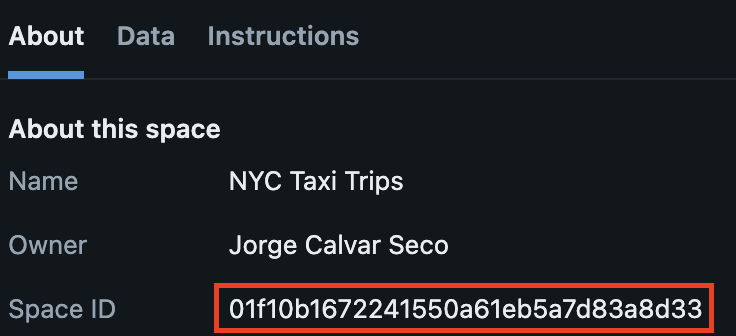
Finding your Genie Space ID
You can find the Space ID from the About tab on your Genie space page in Databricks:
Environment variables
| Variable | Description |
|---|---|
DATABRICKS_GENIE_SPACE_ID | Default Genie Space ID (used when spaces config is omitted) |
HTTP endpoints
The genie plugin exposes these endpoints (mounted under /api/genie):
POST /api/genie/:alias/messages— Send a message to a Genie space (SSE stream)GET /api/genie/:alias/conversations/:conversationId— Replay conversation history (SSE stream)
Send a message
POST /api/genie/:alias/messages
Content-Type: application/json

{
  "content": "What were total sales last quarter?",
  "conversationId": "optional-existing-conversation-id"
}
The response is an SSE stream that emits these event types:
| Event type | Description |
|---|---|
message_start | Conversation and message IDs assigned |
status | Processing status updates (e.g. ASKING_AI, EXECUTING_QUERY) |
message_result | Final message with text and query attachments |
query_result | Tabular data for a query attachment |
error | Error details |
Get conversation history
GET /api/genie/:alias/conversations/:conversationId
Returns an SSE stream of message_result and query_result events for all messages in the conversation.
Programmatic access
The plugin exports sendMessage and getConversation for server-side use:
const AppKit = await createApp({
  plugins: [server(), genie({ spaces: { demo: "space-id" } })],
});

// Stream events
for await (const event of AppKit.genie.sendMessage("demo", "Show revenue by region")) {
  console.log(event.type, event);
}

// Fetch full conversation
const history = await AppKit.genie.getConversation("demo", "conversation-id");
Frontend components
The @databricks/appkit-ui package provides ready-to-use React components for Genie:
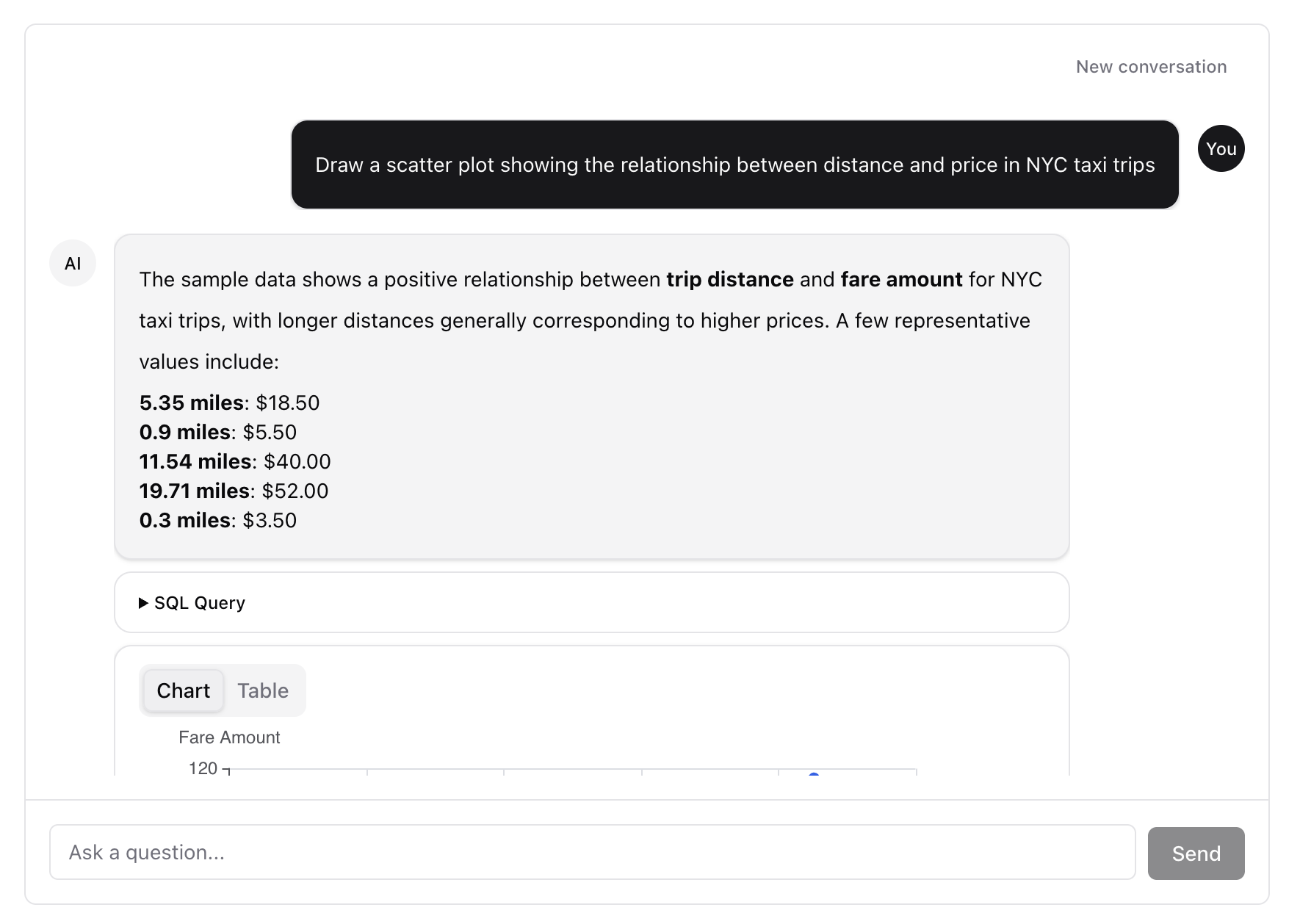
GenieChat
A full-featured chat interface that handles streaming, history, and reconnection:
import { GenieChat } from "@databricks/appkit-ui/react";

function GeniePage() {
  return (
    <div style={{ height: 600 }}>
      <GenieChat alias="demo" />
    </div>
  );
}
The alias prop must match a key in the spaces configuration on the server.
useGenieChat hook
For custom chat UIs, use the useGenieChat hook directly:
import { useGenieChat } from "@databricks/appkit-ui/react";

function CustomChat() {
  const { messages, status, sendMessage, reset } = useGenieChat({
    alias: "demo",
  });

  return (
    <>
      {messages.map((msg) => (
        <div key={msg.id}>{msg.content}</div>
      ))}
      <button onClick={() => sendMessage("Show top customers")}>Ask</button>
      <button onClick={reset}>New conversation</button>
    </>
  );
}
See the GenieChat component reference for the full props API.